Import, Export and .es Files
.es is ESEER's portable wallpaper format. Use it to share a finished wallpaper between devices while keeping the original Creator project separately when you need editable source data.
What a .es file is
.es is ESEER's portable wallpaper package. It contains the runtime wallpaper configuration together with the assets required to render that wallpaper.
Import a .es wallpaper
Open Wallpaper Manager, find the Import Wallpapers section, then tap Import ES File. The button opens Android's document picker immediately. After you select a file, ESEER copies the package into temporary app storage and validates it before registration.
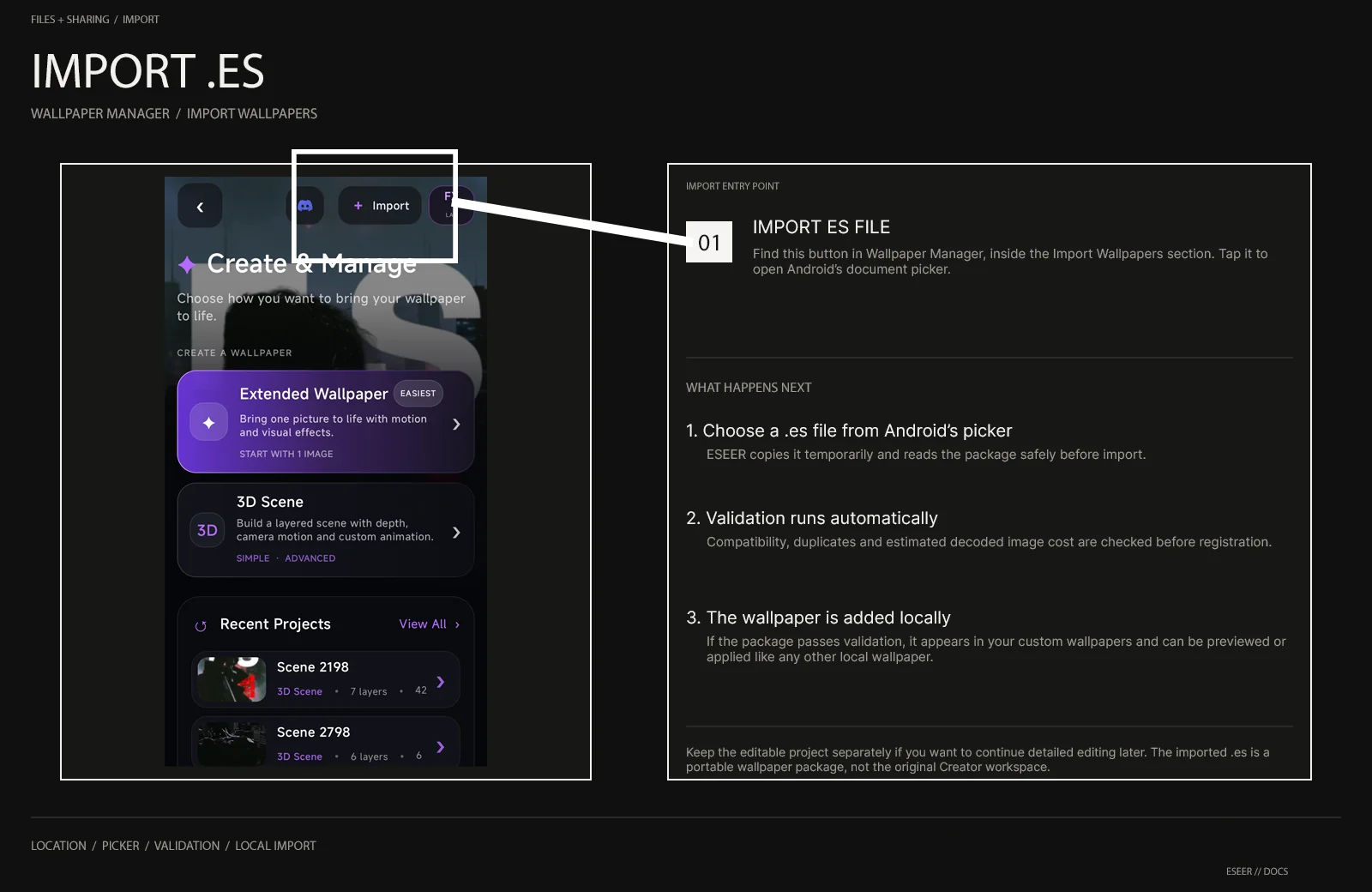
Choose Import ES File
Android opens its document picker. The selected file must use the .es extension.
ESEER prepares the package
The file is copied temporarily and its asset table / image bounds are checked before registration.
Resource safety is evaluated
Image dimensions are converted into an estimated decoded-memory cost and compared with limits appropriate for the device.
The wallpaper is registered
If the package passes validation, ESEER checks compatibility and duplicates, then adds it to the local custom wallpaper list.
Import results
| Message / state | Meaning |
|---|---|
| Only .es files are supported. | The selected file name does not use the .es extension |
| Custom wallpaper imported! | The package was accepted and registered locally |
| Wallpaper already imported. | The exact same package is already registered |
| This wallpaper was created with a newer version of ESEER. | The package requires a newer compatible ESEER runtime |
| Large import — may cause instability | The package is readable, but its estimated decoded memory is high for this device; choose Proceed or Cancel |
| Import blocked — too large | The package exceeds the current device safety limit and cannot be imported |
| Failed to import .es wallpaper. | The package could not be prepared, parsed or registered |
What ESEER checks
- The .es header length and configuration must be readable and bounded.
- The asset entry table must contain valid counts, offsets and payload sizes inside the actual file.
- Image bounds must be readable before the resource-safety check can continue.
- The wallpaper configuration must be compatible with the installed ESEER runtime.
- The package checksum must not already exist in the local custom wallpaper list.
- The estimated decoded image cost must remain within the current device safety policy.
Export and share
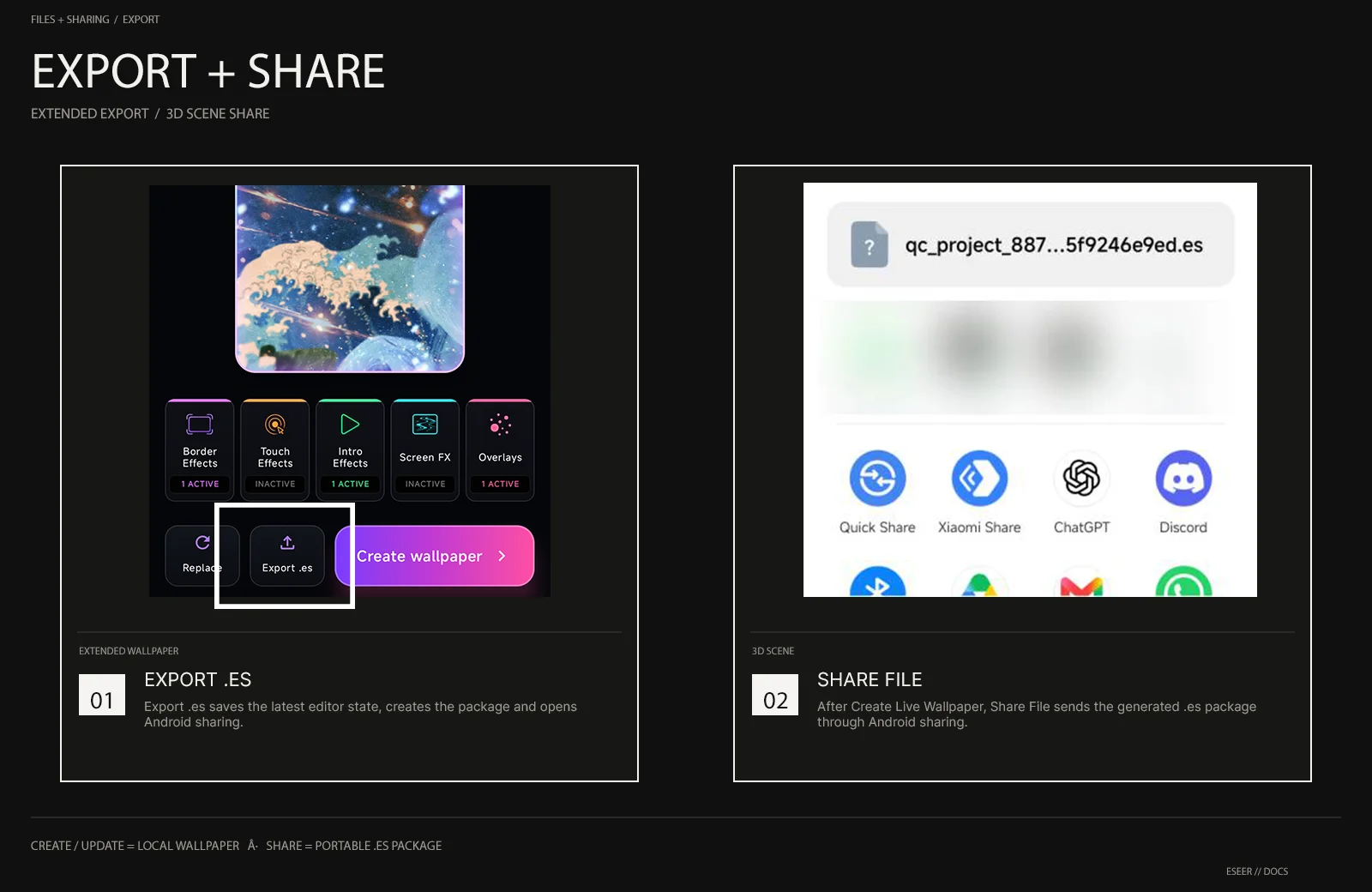
| Workflow | Export / share path |
|---|---|
| Extended Wallpaper | Use Export .es from the bottom action row. ESEER saves the latest editor state, exports the package and opens Android sharing. |
| 3D Scene | Create or update the wallpaper. After creation, use Share File from the created-wallpaper actions. |
| Receiving device | Open Import Wallpapers → Import ES File and select the shared package. |
Sharing and asset safety
- Keep the editable Creator project if you expect to revise the wallpaper later.
- Reduce oversized source images if an import is warned or blocked instead of manually modifying the .es package.
- Do not rename, remove or replace internal package assets and expect references inside the package to repair themselves.
- Only redistribute artwork, fonts, textures and other assets when you have the rights to share them. Packaging content in .es does not change its license.