Pinned Layers
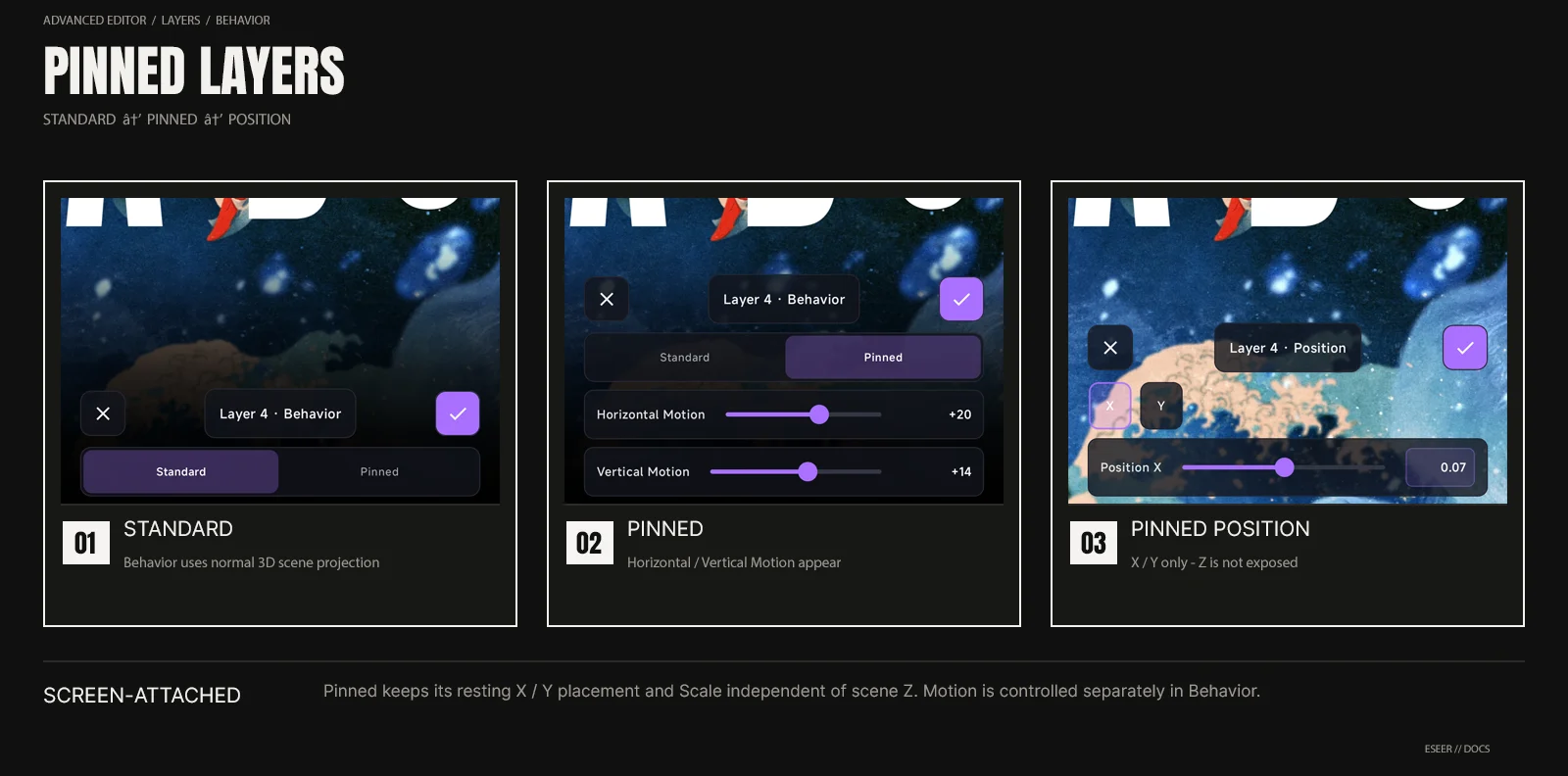
Added in v1.3.50Pinned is an Advanced-only behavior for overlays that should stay screen-attached instead of inheriting normal 3D scene depth. Position/Scale sets the resting placement, while Horizontal/Vertical Motion controls how much it moves.
Standard versus Pinned
| Behavior | Motion model | Good uses |
|---|---|---|
| Standard | Uses the normal 3D scene depth, perspective and camera parallax | Background, subject, foreground and elements that should inherit scene depth |
| Pinned | Uses a screen-facing projection with independent Horizontal / Vertical Motion | Logos, labels, HUD-like graphics, interactive or decorative overlays |
Where Pinned controls live
In Advanced → Layers, select the layer and open Behavior. Choose Pinned; Horizontal Motion and Vertical Motion appear in that panel. The selected target also shows a PINNED status badge. Pinned behavior is not editable from Simple.
Stable Position and Scale
Pinned layers keep their Position X/Y and Scale anchored to the screen. Their resting placement does not use scene Z or the live Orbit camera projection.
| Change elsewhere | Pinned result |
|---|---|
| Reorder the layer | X/Y placement and Scale stay visually stable; compositing order can still change |
| Change Simple Depth preset | Resting placement and size stay independent of Standard-layer depth spacing |
| Change scene/camera depth | Pinned placement and size remain screen-attached |
| Edit Pinned Position | Only X and Y are exposed |
| Old/saved Z value | May remain stored for compatibility, but is ignored by the Pinned projection |
Pinned Position
| Axis | Slider range | Manual entry |
|---|---|---|
| X | -8 → +8 | -50 → +50 |
| Y | -8 → +8 | -50 → +50 |
| Z | Not exposed | Not exposed |
Tap the displayed numeric X/Y value to enter a manual value. The slider remains narrower for precision while manual entry accepts values up to ±50.
Pinned motion strength
| Control | Range | Meaning |
|---|---|---|
| Horizontal Motion | -100 → +100 | Independent horizontal Pinned response; negative values reverse the response direction |
| Vertical Motion | -100 → +100 | Independent vertical Pinned response; negative values reverse the response direction |
Pinned Transform behavior
Pinned stays screen-facing. Position and Transform values are still stored per layer, but not every 3D transform affects the Pinned projection in the same way as Standard.
| Control | Pinned behavior |
|---|---|
| Position X / Y | Sets the resting screen position |
| Scale | Sets the resting screen size |
| Rotation Z | Applied normally around the screen-facing layer |
| Flip H / V | Applied normally |
| Rotation X / Y | Intentionally ignored while Pinned so the layer remains screen-facing |
| Position Z / scene depth | Ignored by the Pinned projection |
| Horizontal / Vertical Motion | Adds independent motion around the resting X/Y position |