Extended Wallpapers
Extended Wallpaper is the quickest ESEER workflow for bringing a complete image to life. Start from one base picture, tune its motion, add effects or overlays, then create or export the wallpaper.
Extended Wallpaper editor
Extended Wallpaper starts from one finished JPG, PNG or WebP image. That image stays as the base canvas while ESEER adds motion, effects, overlays / elements and an optional visual intro on top.
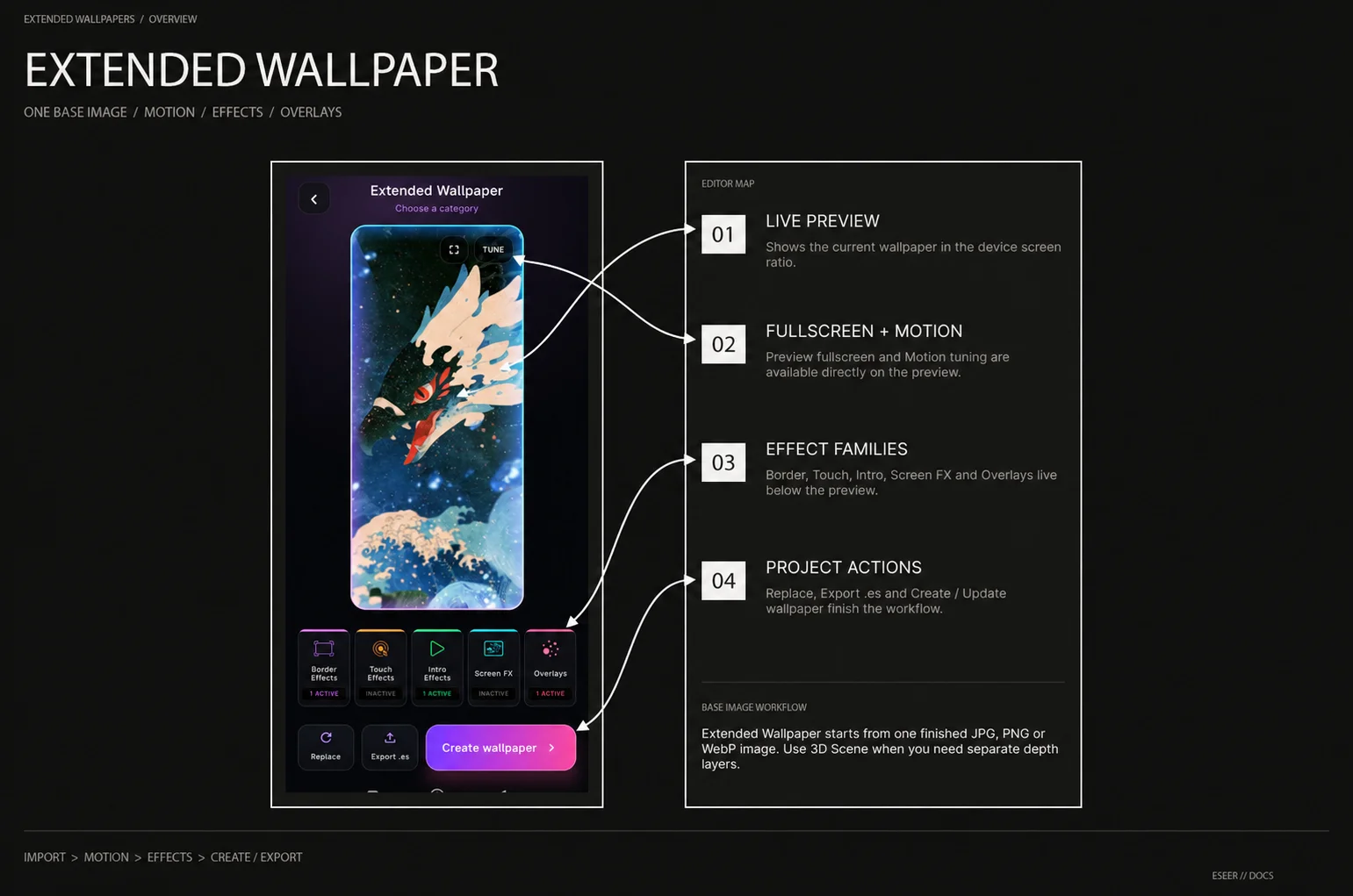
| Area | What it does |
|---|---|
| Live preview | Shows the current wallpaper using the device screen aspect ratio |
| Fullscreen | Expands the live preview to the full screen |
| Motion tuning | Opens movement, framing and response controls |
| Effect families | Opens Border Effects, Touch Effects, Intro Effects, Screen FX or Overlays |
| Replace | Changes the base image while keeping the project workflow |
| Export .es | Exports and shares the current Extended Wallpaper project |
| Create / Update wallpaper | Adds the project to the local wallpaper workflow or updates its existing wallpaper |
Base image
The base image can be JPG, PNG or WebP. Extended Wallpaper is designed for artwork that is already composed as one image, so you do not need to separate foreground, subject and background into individual 3D layers.
Motion tuning
Open Motion tuning from the preview to adjust movement while the live preview updates. Motion settings are stored with the project and can be changed independently from the visual effects.
| Control | Range / options | Behavior |
|---|---|---|
| Static image | On / Off | Stops picture movement and zoom while leaving visual effects available |
| Motion control | Gyro · Touch · Gyro + Touch | Chooses the public input mode used by the wallpaper and motion-aware effects |
| Preset | Subtle · Balanced · Strong | Applies a coordinated motion setup that can still be fine-tuned afterward |
| Horizontal | 0% → 200% | Horizontal movement strength |
| Vertical | 0% → 200% | Vertical movement strength |
| Edge safety | 0% → 30% | Crops extra image area to reduce the chance of exposing empty borders during motion |
| Response speed | 2% → 40% | Higher values follow input faster; lower values feel softer |
| Touch sensitivity | 0.5× → 5.0× | Scales finger response; shown when Touch mode is selected |
Motion presets
| Preset | Horizontal | Vertical | Edge safety | Response | Touch sensitivity |
|---|---|---|---|---|---|
| Subtle | 62% | 46% | 7% | 10% | 1.8× |
| Balanced | 100% | 78% | 10% | 14% | 2.6× |
| Strong | 142% | 108% | 16% | 18% | 3.4× |
Presets are starting points rather than locked modes. Balanced matches the default motion setup of a new Extended Wallpaper, and every value can be adjusted afterward.
Effects, overlays and visual intros
The main effect row opens five public families: Border Effects, Touch Effects, Intro Effects, Screen FX and Overlays. Several effects can be combined in the same Extended Wallpaper.
For the complete effect list, Holographic Foil Randomize behavior, Overlays and VFX / Reveal intro workflow, see Effects & Reveals.
Editable Elements
Overlays → Elements can place editable project elements over the base artwork. Asset Studio text can remain editable in the project while ESEER uses its rendered result inside the wallpaper.
| Element property | Range / meaning |
|---|---|
| Position X / Y | Normalized placement across the base image |
| Scale | 0.05 → 2.00 |
| Rotation | -180° → +180° |
| Opacity | 0 → 1 |
| Parallax strength | 0 → 1.50 |
| Element count | Up to 4 Elements per Extended Wallpaper |
Project actions
| Action | What it does |
|---|---|
| Replace | Selects a new base image |
| Export .es | Saves the latest project state, exports the .es package and opens Android sharing |
| Create wallpaper | Creates the local wallpaper entry from this project |
| Update wallpaper | Updates the existing wallpaper when this project already owns one |
| Finish | Leaves the currently opened effect family and returns to the main editor actions |
Extended Wallpaper or 3D Scene?
| If the project mainly needs… | Use |
|---|---|
| One finished image with motion, effects, touch reactions and overlays | Extended Wallpaper |
| Separate foreground / subject / background artwork with authored depth | 3D Scene |
| Camera FOV and per-layer 3D positioning / transforms | 3D Scene Advanced Editor |
| Editable styled text over one finished image | Extended Wallpaper + Asset Studio Element |