3D Scene: Advanced Editor
Advanced is the detailed 3D Scene editor. Its rail is organized around Layers, Camera, Scene and Intro; settings for one layer are edited from Layers.
Advanced Editor navigation
The current Advanced rail exposes four workspaces: Layers, Camera, Scene and Intro. Effects are no longer a separate global rail destination: layer effects are edited from the selected layer, while whole-scene settings live in Scene.
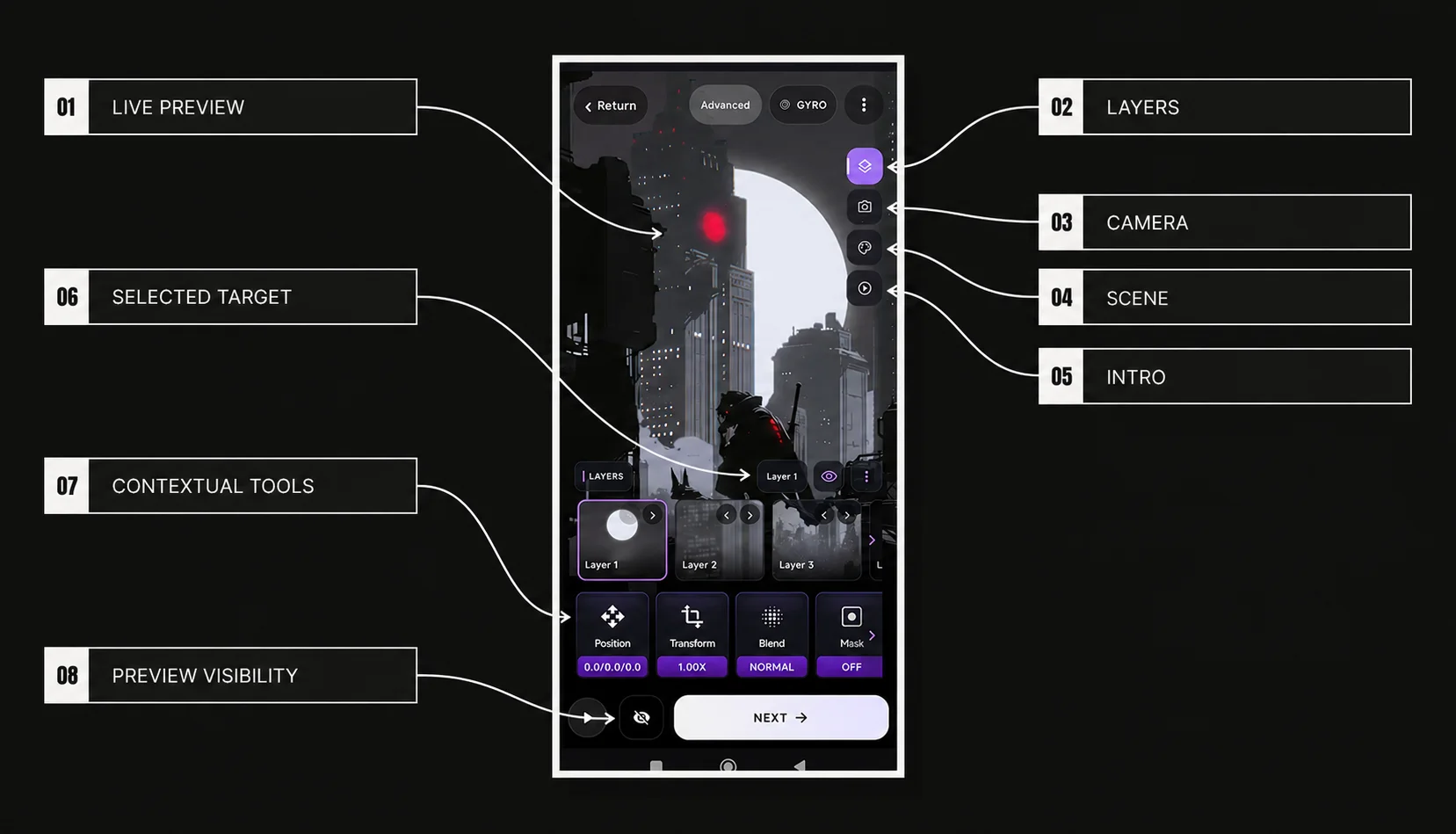
| # | Interface element | Purpose |
|---|---|---|
| 01 | Live Preview | Shows the current scene while Advanced controls are edited |
| 02 | Layers | Opens layer selection, transforms, Blend and layer behavior controls |
| 03 | Camera | Opens whole-scene Field of View, motion, orbit target and smoothing controls |
| 04 | Scene | Opens scene-wide Background and Dynamic Shadows controls |
| 05 | Intro | Opens per-layer or Camera intro Motion, Transform, Timing and Effects |
| 06 | Selected Target | Defines which layer or Camera the current controls apply to |
| 07 | Contextual Tools | Shows the controls available for the current workspace and target |
| 08 | Preview Visibility | Temporarily hides editor controls or selected content without changing the saved wallpaper |
| Rail item | Context | Current role |
|---|---|---|
| Layers | Selected layer | Position, Transform, Blend, Mask, Shadow, Effects, Behavior, Visibility and Action; More stays separate in the layer header |
| Camera | Whole-scene camera | Field of View, Horizontal, Vertical, Orbit Around, Smoothing |
| Scene | Whole scene | Background color and Dynamic Shadows |
| Intro | Selected layer or Camera | Motion, Transform, Timing and Effects |
Context-sensitive controls
Advanced works in two steps: choose a workspace, then choose what you want to edit. In Layers, the selected card decides which layer receives Position, Transform, Blend and behavior changes. In Intro, choose Layers or Camera first; layer-only controls are unavailable when Camera is selected.
Layers workspace
The Layers control strip is ordered Position → Transform → Blend → Mask → Shadow → Effects → Behavior → Visibility → Action. Scale lives inside Transform. More is separate from that strip and contains image/layer operations. See Layer Management, Layer Position, Layer Scale, Rotation & Flip and Blend Modes for the dedicated references.
Camera workspace
Camera exposes Field of View, Horizontal, Vertical, Orbit Around and Smoothing, in that card order. These values operate on the view of the whole layer stack.
See Camera FOV, Camera Motion, Orbit Around and Camera Smoothing for the dedicated references.
Scene workspace
Scene contains Background and Shadows. Background uses the native Advanced color picker. Shadows is a scene controller that makes already-enabled per-layer shadows react to wallpaper motion; it does not create shadows on layers by itself. See Scene Background and Dynamic Shadows for their dedicated references.
Intro workspace
Intro is organized by target Layers / Camera and four cards in the current order: Motion, Transform, Timing and Effects. Camera currently uses Motion and Timing; Transform and Effects are layer-only.
See Advanced Intro for the workspace overview, then use the dedicated Motion, Timing, Transform, Fade, Intro Effects and Camera Intro reference pages for exact controls.
Relationship with Simple Editor
Advanced does not create a separate version of the project. Switching Simple ↔ Advanced keeps the current scene unchanged. Simple Depth changes layer spacing without resetting Advanced camera values. For intros, a layer with its own Advanced settings uses them, while other layers can still use the Simple preset.